mirror of
https://github.com/trustgraph-ai/trustgraph.git
synced 2026-04-25 08:26:21 +02:00

275 lines
10 KiB
Markdown
275 lines
10 KiB
Markdown
|
||
<div align="center">
|
||
|
||
<img src="TG-fullname-logo.svg" width=100% />
|
||
|
||
[](https://pypi.org/project/trustgraph/) [](LICENSE) 
|
||
[](https://discord.gg/sQMwkRz5GX) [](https://deepwiki.com/trustgraph-ai/trustgraph)
|
||
|
||
[**Website**](https://trustgraph.ai) | [**Docs**](https://docs.trustgraph.ai) | [**YouTube**](https://www.youtube.com/@TrustGraphAI?sub_confirmation=1) | [**Configuration Terminal**](https://config-ui.demo.trustgraph.ai/) | [**Discord**](https://discord.gg/sQMwkRz5GX) | [**Blog**](https://blog.trustgraph.ai/subscribe)
|
||
|
||
<a href="https://trendshift.io/repositories/17291" target="_blank"><img src="https://trendshift.io/api/badge/repositories/17291" alt="trustgraph-ai%2Ftrustgraph | Trendshift" style="width: 250px; height: 55px;" width="250" height="55"/></a>
|
||
|
||
# The context development platform
|
||
|
||
</div>
|
||
|
||
Building applications that need to know things requires more than a database. [TrustGraph](https://trustgraph.ai) is the context development platform: graph-native infrastructure for storing, enriching, and retrieving structured knowledge at any scale. Think like [Supabase](https://github.com/supabase/supabase) but built around context graphs: multi-model storage, semantic retrieval pipelines, portable [context cores](#context-cores), and a full developer toolkit out of the box. Deploy locally or in the cloud. No unnecessary API keys. Just context, engineered.
|
||
|
||
The platform:
|
||
- [x] Multi-model and multimodal database system
|
||
- [x] Tabular/relational, key-value
|
||
- [x] Document, graph, and vectors
|
||
- [x] Images, video, and audio
|
||
- [x] Automated data ingest and loading
|
||
- [x] Quick ingest with semantic similarity retrieval
|
||
- [x] Ontology structuring for precision retrieval
|
||
- [x] Out-of-the-box RAG pipelines
|
||
- [x] DocumentRAG
|
||
- [x] GraphRAG
|
||
- [x] OntologyRAG
|
||
- [x] 3D GraphViz for exploring context
|
||
- [x] Fully Agentic System
|
||
- [x] Single Agent
|
||
- [x] Multi Agent
|
||
- [x] MCP integration
|
||
- [x] Run anywhere
|
||
- [x] Deploy locally with Docker
|
||
- [x] Deploy in cloud with Kubernetes
|
||
- [x] Support for all major LLMs
|
||
- [x] API support for Anthropic, Cohere, Gemini, Mistral, OpenAI, and others
|
||
- [x] Model inferencing with vLLM, Ollama, TGI, LM Studio, and Llamafiles
|
||
- [x] Developer friendly
|
||
- [x] REST API [Docs](https://docs.trustgraph.ai/reference/apis/rest.html)
|
||
- [x] Websocket API [Docs](https://docs.trustgraph.ai/reference/apis/websocket.html)
|
||
- [x] Python API [Docs](https://docs.trustgraph.ai/reference/apis/python)
|
||
- [x] CLI [Docs](https://docs.trustgraph.ai/reference/cli/)
|
||
|
||
## No API Keys Required
|
||
|
||
How many times have you cloned a repo and opened the `.env.example` to see the dozens of API keys for 3rd party dependencies needed to make the services work? There are only 3 things in TrustGraph that might need an API key:
|
||
|
||
- 3rd party LLM services like Anthropic, Cohere, Gemini, Mistral, OpenAI, etc.
|
||
- 3rd party OCR like Mistral OCR
|
||
- The API key *you set* for the TrustGraph API gateway
|
||
|
||
Everything else is included.
|
||
- [x] Managed Multi-model storage in [Cassandra](https://cassandra.apache.org/_/index.html)
|
||
- [x] Managed Vector embedding storage in [Qdrant](https://github.com/qdrant/qdrant)
|
||
- [x] Managed File and Object storage in [Garage](https://github.com/deuxfleurs-org/garage) (S3 compatible)
|
||
- [x] Managed High-speed Pub/Sub messaging fabric with [Pulsar](https://github.com/apache/pulsar)
|
||
- [x] Complete LLM inferencing stack for open LLMs with [vLLM](https://github.com/vllm-project/vllm), [TGI](https://github.com/huggingface/text-generation-inference), [Ollama](https://github.com/ollama/ollama), [LM Studio](https://github.com/lmstudio-ai), and [Llamafiles](https://github.com/mozilla-ai/llamafile)
|
||
|
||
## Quickstart
|
||
|
||
There's no need to clone this repo, unless you want to build from source. TrustGraph is a fully containerized app that deploys as a set of Docker containers. To configure TrustGraph on the command line:
|
||
|
||
```
|
||
npx @trustgraph/config
|
||
```
|
||
|
||
The config process will generate an app config that can be run locally with Docker, Podman, or Minikube. The process will output:
|
||
- `deploy.zip` with either a `docker-compose.yaml` file for a Docker/Podman or `resources.yaml` for Kubernetes
|
||
- Deployment instructions as `INSTALLATION.md`
|
||
|
||
<p align="center">
|
||
<video src="https://github.com/user-attachments/assets/2978a6aa-4c9c-4d7c-ad02-8f3d01a1c602"
|
||
width="80%" controls></video>
|
||
</p>
|
||
|
||
For a browser based configuration, try the [Configuration Terminal](https://config-ui.demo.trustgraph.ai/).
|
||
|
||
## Watch What is a Context Graph?
|
||
|
||
[](https://www.youtube.com/watch?v=gZjlt5WcWB4)
|
||
|
||
## Watch Context Graphs in Action
|
||
|
||
[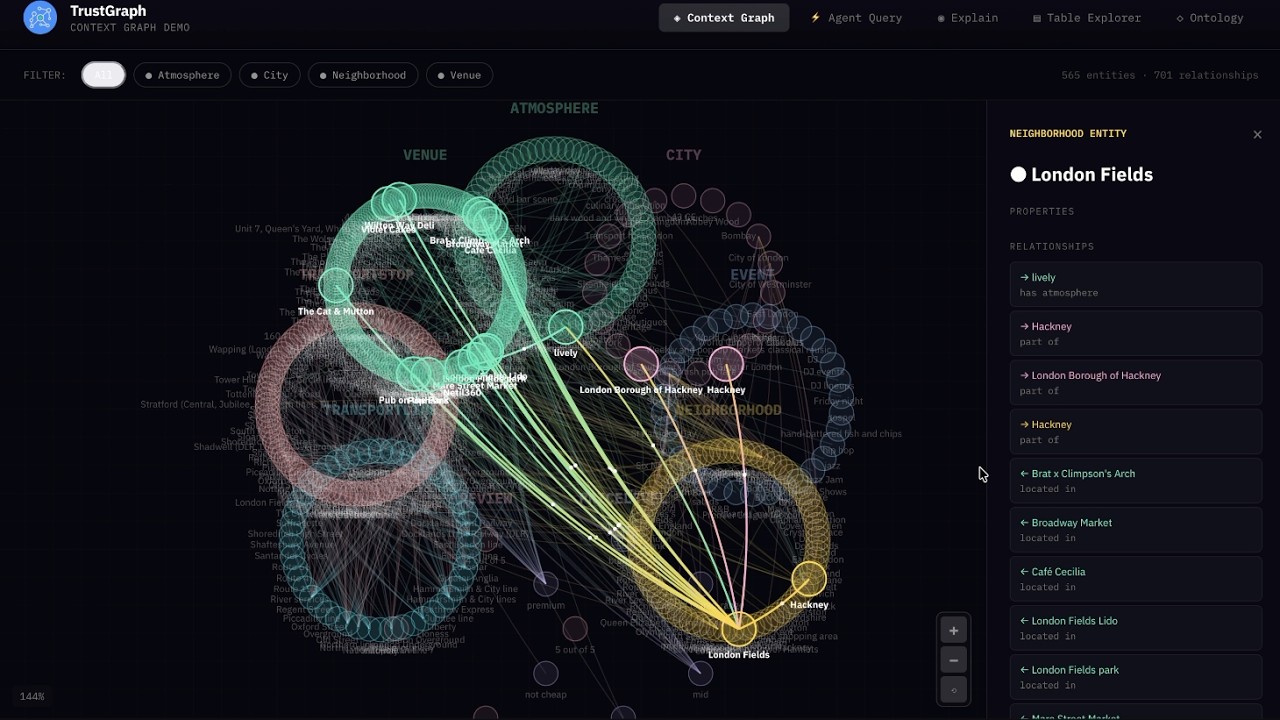](https://www.youtube.com/watch?v=sWc7mkhITIo)
|
||
|
||
## Getting Started with TrustGraph
|
||
|
||
- [**Getting Started Guides**](https://docs.trustgraph.ai/getting-started)
|
||
- [**Using the Workbench**](#workbench)
|
||
- [**Developer APIs and CLI**](https://docs.trustgraph.ai/reference)
|
||
- [**Deployment Guides**](https://docs.trustgraph.ai/deployment)
|
||
|
||
## Workbench
|
||
|
||
The **Workbench** provides tools for all major features of TrustGraph. The **Workbench** is on port `8888` by default.
|
||
|
||
- **Vector Search**: Search the installed knowledge bases
|
||
- **Agentic, GraphRAG and LLM Chat**: Chat interface for agents, GraphRAG queries, or direct to LLMs
|
||
- **Relationships**: Analyze deep relationships in the installed knowledge bases
|
||
- **Graph Visualizer**: 3D GraphViz of the installed knowledge bases
|
||
- **Library**: Staging area for installing knowledge bases
|
||
- **Flow Classes**: Workflow preset configurations
|
||
- **Flows**: Create custom workflows and adjust LLM parameters during runtime
|
||
- **Knowledge Cores**: Manage resuable knowledge bases
|
||
- **Prompts**: Manage and adjust prompts during runtime
|
||
- **Schemas**: Define custom schemas for structured data knowledge bases
|
||
- **Ontologies**: Define custom ontologies for unstructured data knowledge bases
|
||
- **Agent Tools**: Define tools with collections, knowledge cores, MCP connections, and tool groups
|
||
- **MCP Tools**: Connect to MCP servers
|
||
|
||
## TypeScript Library for UIs
|
||
|
||
There are 3 libraries for quick UI integration of TrustGraph services.
|
||
|
||
- [@trustgraph/client](https://www.npmjs.com/package/@trustgraph/client)
|
||
- [@trustgraph/react-state](https://www.npmjs.com/package/@trustgraph/react-state)
|
||
- [@trustgraph/react-provider](https://www.npmjs.com/package/@trustgraph/react-provider)
|
||
|
||
## Context Cores
|
||
|
||
A Context Core is a **portable, versioned bundle of context** that you can ship between projects and environments, pin in production, and reuse across agents. It packages the “stuff agents need to know” (structured knowledge + embeddings + evidence + policies) into a single artifact, so you can treat context like code: build it, test it, version it, promote it, and roll it back. TrustGraph is built to support this kind of end-to-end context engineering and orchestration workflow.
|
||
|
||
### What’s inside a Context Core
|
||
A Context Core typically includes:
|
||
- Ontology (your domain schema) and mappings
|
||
- Context Graph (entities, relationships, supporting evidence)
|
||
- Embeddings / vector indexes for fast semantic entry-point lookup
|
||
- Source manifests + provenance (where facts came from, when, and how they were derived)
|
||
- Retrieval policies (traversal rules, freshness, authority ranking)
|
||
|
||
## Tech Stack
|
||
TrustGraph provides component flexibility to optimize agent workflows.
|
||
|
||
<details>
|
||
<summary>LLM APIs</summary>
|
||
<br>
|
||
|
||
- Anthropic<br>
|
||
- AWS Bedrock<br>
|
||
- AzureAI<br>
|
||
- AzureOpenAI<br>
|
||
- Cohere<br>
|
||
- Google AI Studio<br>
|
||
- Google VertexAI<br>
|
||
- Mistral<br>
|
||
- OpenAI<br>
|
||
|
||
</details>
|
||
<details>
|
||
<summary>LLM Orchestration</summary>
|
||
<br>
|
||
|
||
- LM Studio<br>
|
||
- Llamafiles<br>
|
||
- Ollama<br>
|
||
- TGI<br>
|
||
- vLLM<br>
|
||
|
||
</details>
|
||
<details>
|
||
<summary>Multi-model storage</summary>
|
||
<br>
|
||
|
||
- Apache Cassandra<br>
|
||
|
||
</details>
|
||
<details>
|
||
<summary>VectorDB</summary>
|
||
<br>
|
||
|
||
- Qdrant<br>
|
||
|
||
</details>
|
||
<details>
|
||
<summary>File and Object Storage</summary>
|
||
<br>
|
||
|
||
- Garage<br>
|
||
|
||
</details>
|
||
<details>
|
||
<summary>Observability</summary>
|
||
<br>
|
||
|
||
- Prometheus<br>
|
||
- Grafana<br>
|
||
- Loki<br>
|
||
|
||
</details>
|
||
<details>
|
||
<summary>Data Streaming</summary>
|
||
<br>
|
||
|
||
- Apache Pulsar<br>
|
||
|
||
</details>
|
||
<details>
|
||
<summary>Clouds</summary>
|
||
<br>
|
||
|
||
- AWS<br>
|
||
- Azure<br>
|
||
- Google Cloud<br>
|
||
- OVHcloud<br>
|
||
- Scaleway<br>
|
||
|
||
</details>
|
||
|
||
## Observability & Telemetry
|
||
|
||
Once the platform is running, access the Grafana dashboard at:
|
||
|
||
```
|
||
http://localhost:3000
|
||
```
|
||
|
||
Default credentials are:
|
||
|
||
```
|
||
user: admin
|
||
password: admin
|
||
```
|
||
|
||
The default Grafana dashboard tracks the following:
|
||
|
||
<details>
|
||
<summary>Telemetry</summary>
|
||
<br>
|
||
|
||
- LLM Latency<br>
|
||
- Error Rate<br>
|
||
- Service Request Rates<br>
|
||
- Queue Backlogs<br>
|
||
- Chunking Histogram<br>
|
||
- Error Source by Service<br>
|
||
- Rate Limit Events<br>
|
||
- CPU usage by Service<br>
|
||
- Memory usage by Service<br>
|
||
- Models Deployed<br>
|
||
- Token Throughput (Tokens/second)<br>
|
||
- Cost Throughput (Cost/second)<br>
|
||
|
||
</details>
|
||
|
||
## Contributing
|
||
|
||
[Developer's Guide](https://docs.trustgraph.ai/guides/building/introduction.html)
|
||
|
||
## License
|
||
|
||
**TrustGraph** is licensed under [Apache 2.0](https://www.apache.org/licenses/LICENSE-2.0).
|
||
|
||
Copyright 2024-2025 TrustGraph
|
||
|
||
Licensed under the Apache License, Version 2.0 (the "License");
|
||
you may not use this file except in compliance with the License.
|
||
You may obtain a copy of the License at
|
||
|
||
http://www.apache.org/licenses/LICENSE-2.0
|
||
|
||
Unless required by applicable law or agreed to in writing, software
|
||
distributed under the License is distributed on an "AS IS" BASIS,
|
||
WITHOUT WARRANTIES OR CONDITIONS OF ANY KIND, either express or implied.
|
||
See the License for the specific language governing permissions and
|
||
limitations under the License.
|
||
|
||
## Support & Community
|
||
- Bug Reports & Feature Requests: [Discord](https://discord.gg/sQMwkRz5GX)
|
||
- Discussions & Questions: [Discord](https://discord.gg/sQMwkRz5GX)
|
||
- Documentation: [Docs](https://docs.trustgraph.ai/)
|