
Assign different roles to GPTs to form a collaborative software entity for complex tasks.







Software Company Multi-Role Schematic (Gradually Implementing)
## Examples (fully generated by GPT-4) For example, if you type `python startup.py "Design a RecSys like Toutiao"`, you would get many outputs, one of them is data & api design 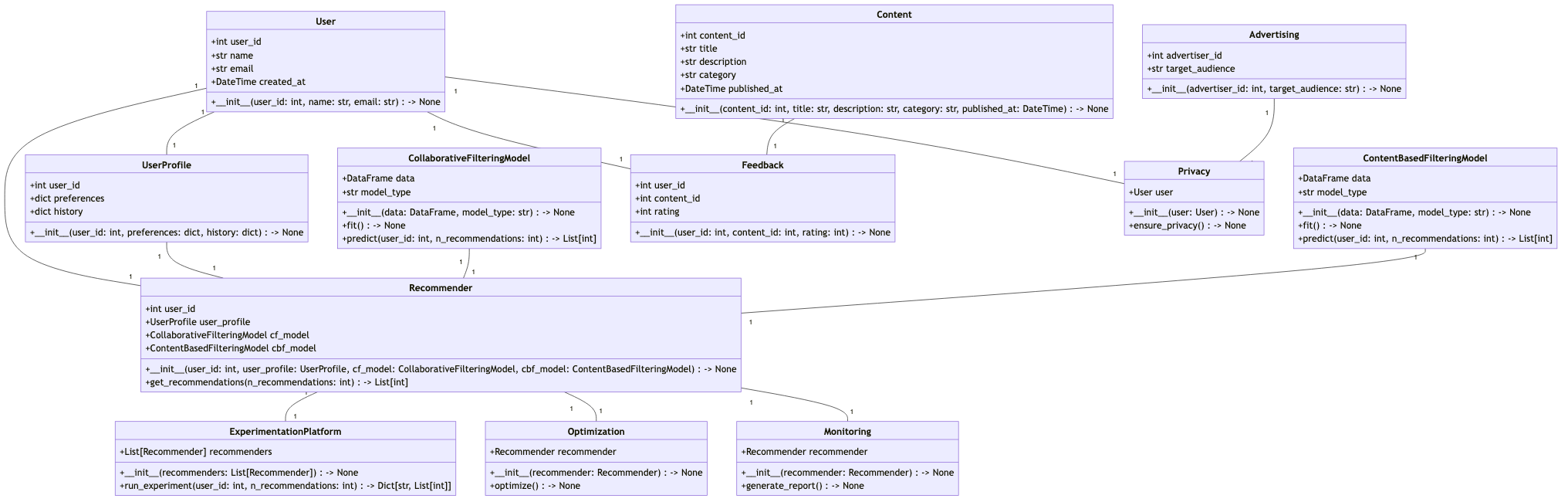 It requires around **$0.2** (GPT-4 api's costs) to generate one example with analysis and design, around **$2.0** to a full project. ## Installation ### Traditional Installation ```bash # Step 1: Ensure that NPM is installed on your system. Then install mermaid-js. npm --version sudo npm install -g @mermaid-js/mermaid-cli # Step 2: Ensure that Python 3.9+ is installed on your system. You can check this by using: python --version # Step 3: Clone the repository to your local machine, and install it. git clone https://github.com/geekan/metagpt cd metagpt python setup.py install ``` **Note:** - If already have Chrome, Chromium, or MS Edge installed, you can skip downloading Chromium by setting the environment variable `PUPPETEER_SKIP_CHROMIUM_DOWNLOAD` to `true`. - Some people are [having issues](https://github.com/mermaidjs/mermaid.cli/issues/15) installing this tool globally. Installing it locally is an alternative solution, ```bash npm install @mermaid-js/mermaid-cli ``` - don't forget to the configuration for mmdc in config.yml ```yml PUPPETEER_CONFIG: "./puppeteer-config.json" MMDC: "./node_modules/.bin/mmdc" ``` ### Installation by Docker ```bash # Step 1: Download metagpt official image and prepare config.yaml docker pull metagpt/metagpt:v0.3 mkdir -p /opt/metagpt/{config,workspace} docker run --rm metagpt/metagpt:v0.3 cat /app/metagpt/config/config.yaml > /opt/metagpt/config/config.yaml vim /opt/metagpt/config/config.yaml # Change the config # Step 2: Run metagpt demo with container docker run --rm \ --privileged \ -v /opt/metagpt/config:/app/metagpt/config \ -v /opt/metagpt/workspace:/app/metagpt/workspace \ metagpt/metagpt:v0.3 \ python startup.py "Write a cli snake game" # You can also start a container and execute commands in it docker run --name metagpt -d \ --privileged \ -v /opt/metagpt/config:/app/metagpt/config \ -v /opt/metagpt/workspace:/app/metagpt/workspace \ metagpt/metagpt:v0.3 docker exec -it metagpt /bin/bash $ python startup.py "Write a cli snake game" ``` The command `docker run ...` do the following things: - Run in privileged mode to have permission to run the browser - Map host directory `/opt/metagpt/config` to container directory `/app/metagpt/config` - Map host directory `/opt/metagpt/workspace` to container directory `/app/metagpt/workspace` - Execute the demo command `python startup.py "Write a cli snake game"` ### Build image by yourself ```bash # You can also build metagpt image by yourself. git clone https://github.com/geekan/MetaGPT.git cd MetaGPT && docker build -t metagpt:v0.3 . ``` ## Configuration - Configure your `OPENAI_API_KEY` in any of `config/key.yaml / config/config.yaml / env` - Priority order: `config/key.yaml > config/config.yaml > env` ```bash # Copy the configuration file and make the necessary modifications. cp config/config.yaml config/key.yaml ``` | Variable Name | config/key.yaml | env | | ------------------------------------------ | ----------------------------------------- | ----------------------------------------------- | | OPENAI_API_KEY # Replace with your own key | OPENAI_API_KEY: "sk-..." | export OPENAI_API_KEY="sk-..." | | OPENAI_API_BASE # Optional | OPENAI_API_BASE: "https://