 ae9936c9cc
A generic, long-running bootstrap processor that converges a
deployment to its configured initial state and then idles.
Replaces the previous one-shot `tg-init-trustgraph` container model
and provides an extension point for enterprise / third-party
initialisers.

See docs/tech-specs/bootstrap.md for the full design.

Bootstrapper
------------
A single AsyncProcessor (trustgraph.bootstrap.bootstrapper.Processor)
that:

  * Reads a list of initialiser specifications (class, name, flag,
    params) from either a direct `initialisers` parameter
    (processor-group embedding) or a YAML/JSON file (`-c`, CLI).
  * On each wake, runs a cheap service-gate (config-svc +
    flow-svc round-trips), then iterates the initialiser list,
    running each whose configured flag differs from the one stored
    in __system__/init-state/<name>.
  * Stores per-initialiser completion state in the reserved
    __system__ workspace.
  * Adapts cadence: ~5s on gate failure, ~15s while converging,
    ~300s in steady state.
  * Isolates failures — one initialiser's exception does not block
    others in the same cycle; the failed one retries next wake.

Initialiser contract
--------------------
  * Subclass trustgraph.bootstrap.base.Initialiser.
  * Implement async run(ctx, old_flag, new_flag).
  * Opt out of the service gate with class attr
    wait_for_services=False (only used by PulsarTopology, since
    config-svc cannot come up until Pulsar namespaces exist).
  * ctx carries short-lived config and flow-svc clients plus a
    scoped logger.

Core initialisers (trustgraph.bootstrap.initialisers.*)
-------------------------------------------------------
  * PulsarTopology   — creates Pulsar tenant + namespaces
                       (pre-gate, blocking HTTP offloaded to
                        executor).
  * TemplateSeed     — seeds __template__ from an external JSON
                       file; re-run is upsert-missing by default,
                       overwrite-all opt-in.
  * WorkspaceInit    — populates a named workspace from either
                       the full contents of __template__ or a
                       seed file; raises cleanly if the template
                       isn't seeded yet so the bootstrapper retries
                       on the next cycle.
  * DefaultFlowStart — starts a specific flow in a workspace;
                       no-ops if the flow is already running.

Enterprise or third-party initialisers plug in via fully-qualified
dotted class paths in the bootstrapper's configuration — no core
code change required.

Config service
--------------
  * push(): filter out reserved workspaces (ids starting with "_")
    from the change notifications.  Stored config is preserved; only
    the broadcast is suppressed, so bootstrap / template state lives
    in config-svc without live processors ever reacting to it.

Config client
-------------
  * ConfigClient.get_all(workspace): wraps the existing `config`
    operation to return {type: {key: value}} for a workspace.
    WorkspaceInit uses it to copy __template__ without needing a
    hardcoded types list.

pyproject.toml
--------------
  * Adds a `bootstrap` console script pointing at the new Processor.

* Remove tg-init-trustgraph, superceded by bootstrap processor
|
||
|---|---|---|
| .github/workflows | ||
| containers | ||
| dev-tools | ||
| docs | ||
| specs | ||
| test-api | ||
| tests | ||
| tests.manual | ||
| trustgraph | ||
| trustgraph-base | ||
| trustgraph-bedrock | ||
| trustgraph-cli | ||
| trustgraph-embeddings-hf | ||
| trustgraph-flow | ||
| trustgraph-mcp | ||
| trustgraph-ocr | ||
| trustgraph-unstructured | ||
| trustgraph-vertexai | ||
| .coveragerc | ||
| .gitignore | ||
| check_imports.py | ||
| context7.json | ||
| DEVELOPER_GUIDE.md | ||
| install_packages.sh | ||
| LICENSE | ||
| Makefile | ||
| ontology-prompt.md | ||
| product-platform-diagram.svg | ||
| prompt.txt | ||
| README.md | ||
| requirements.txt | ||
| run_tests.sh | ||
| schema.ttl | ||
| SECURITY.md | ||
| TEST_CASES.md | ||
| TEST_SETUP.md | ||
| TEST_STRATEGY.md | ||
| TESTS.md | ||
| TG-fullname-logo.svg | ||
| TG-hero-diagram.svg | ||








Building applications that need to know things requires more than a database. TrustGraph is the context development platform: graph-native infrastructure for storing, enriching, and retrieving structured knowledge at any scale. Think like Supabase but built around context graphs: multi-model storage, semantic retrieval pipelines, portable context cores, and a full developer toolkit out of the box. Deploy locally or in the cloud. No unnecessary API keys. Just context, engineered.
The platform:
- Multi-model and multimodal database system
- Tabular/relational, key-value
- Document, graph, and vectors
- Images, video, and audio
- Automated data ingest and loading
- Quick ingest with semantic similarity retrieval
- Ontology structuring for precision retrieval
- Out-of-the-box RAG pipelines
- DocumentRAG
- GraphRAG
- OntologyRAG
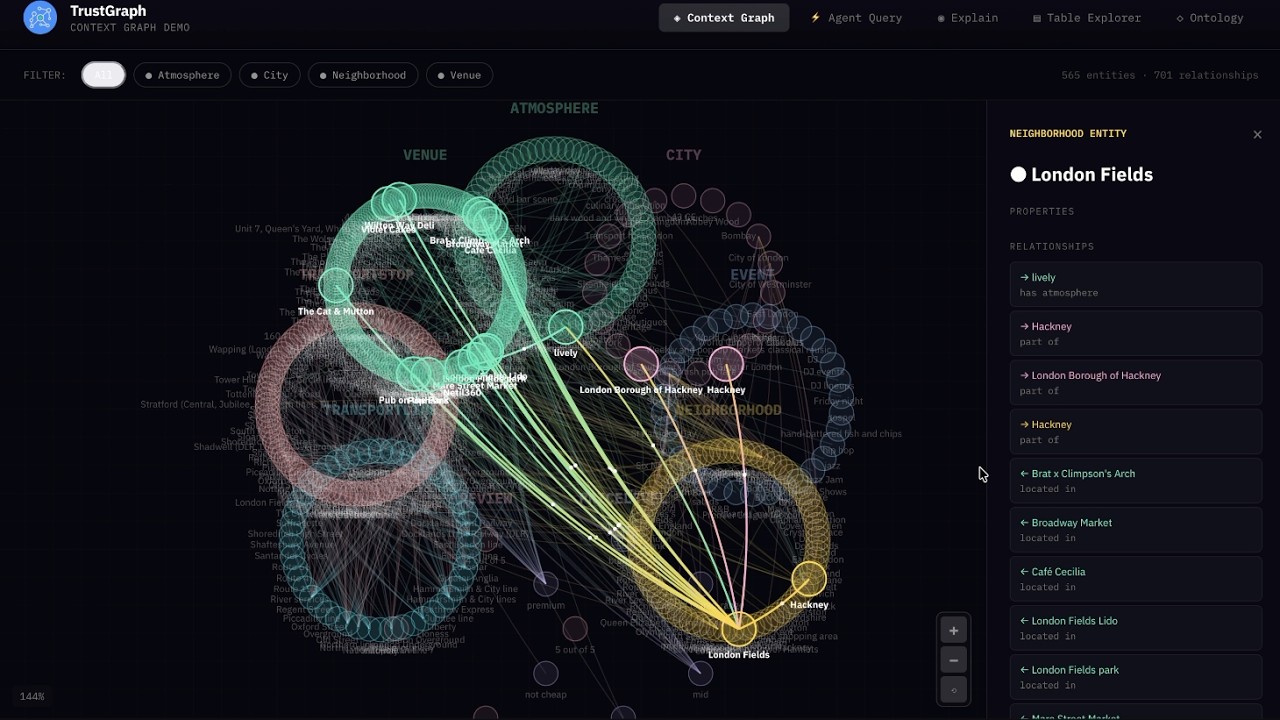
- 3D GraphViz for exploring context
- Fully Agentic System
- Single Agent
- Multi Agent
- MCP integration
- Run anywhere
- Deploy locally with Docker
- Deploy in cloud with Kubernetes
- Support for all major LLMs
- API support for Anthropic, Cohere, Gemini, Mistral, OpenAI, and others
- Model inferencing with vLLM, Ollama, TGI, LM Studio, and Llamafiles
- Developer friendly
No API Keys Required
How many times have you cloned a repo and opened the .env.example to see the dozens of API keys for 3rd party dependencies needed to make the services work? There are only 3 things in TrustGraph that might need an API key:
- 3rd party LLM services like Anthropic, Cohere, Gemini, Mistral, OpenAI, etc.
- 3rd party OCR like Mistral OCR
- The API key you set for the TrustGraph API gateway
Everything else is included.
- Managed Multi-model storage in Cassandra
- Managed Vector embedding storage in Qdrant
- Managed File and Object storage in Garage (S3 compatible)
- Managed High-speed Pub/Sub messaging fabric with Pulsar
- Complete LLM inferencing stack for open LLMs with vLLM, TGI, Ollama, LM Studio, and Llamafiles
Quickstart
There's no need to clone this repo, unless you want to build from source. TrustGraph is a fully containerized app that deploys as a set of Docker containers. To configure TrustGraph on the command line:
npx @trustgraph/config
The config process will generate an app config that can be run locally with Docker, Podman, or Minikube. The process will output:
deploy.zipwith either adocker-compose.yamlfile for a Docker/Podman orresources.yamlfor Kubernetes- Deployment instructions as
INSTALLATION.md
For a browser based configuration, try the Configuration Terminal.
Watch What is a Context Graph?

Watch Context Graphs in Action
Getting Started with TrustGraph
Workbench
The Workbench provides tools for all major features of TrustGraph. The Workbench is on port 8888 by default.
- Vector Search: Search the installed knowledge bases
- Agentic, GraphRAG and LLM Chat: Chat interface for agents, GraphRAG queries, or direct to LLMs
- Relationships: Analyze deep relationships in the installed knowledge bases
- Graph Visualizer: 3D GraphViz of the installed knowledge bases
- Library: Staging area for installing knowledge bases
- Flow Classes: Workflow preset configurations
- Flows: Create custom workflows and adjust LLM parameters during runtime
- Knowledge Cores: Manage resuable knowledge bases
- Prompts: Manage and adjust prompts during runtime
- Schemas: Define custom schemas for structured data knowledge bases
- Ontologies: Define custom ontologies for unstructured data knowledge bases
- Agent Tools: Define tools with collections, knowledge cores, MCP connections, and tool groups
- MCP Tools: Connect to MCP servers
TypeScript Library for UIs
There are 3 libraries for quick UI integration of TrustGraph services.
Context Cores
A Context Core is a portable, versioned bundle of context that you can ship between projects and environments, pin in production, and reuse across agents. It packages the “stuff agents need to know” (structured knowledge + embeddings + evidence + policies) into a single artifact, so you can treat context like code: build it, test it, version it, promote it, and roll it back. TrustGraph is built to support this kind of end-to-end context engineering and orchestration workflow.
What’s inside a Context Core
A Context Core typically includes:
- Ontology (your domain schema) and mappings
- Context Graph (entities, relationships, supporting evidence)
- Embeddings / vector indexes for fast semantic entry-point lookup
- Source manifests + provenance (where facts came from, when, and how they were derived)
- Retrieval policies (traversal rules, freshness, authority ranking)
Tech Stack
TrustGraph provides component flexibility to optimize agent workflows.
LLM APIs
- Anthropic
- AWS Bedrock
- AzureAI
- AzureOpenAI
- Cohere
- Google AI Studio
- Google VertexAI
- Mistral
- OpenAI
LLM Orchestration
- LM Studio
- Llamafiles
- Ollama
- TGI
- vLLM
Multi-model storage
- Apache Cassandra
VectorDB
- Qdrant
File and Object Storage
- Garage
Observability
- Prometheus
- Grafana
- Loki
Data Streaming
- Apache Pulsar
Clouds
- AWS
- Azure
- Google Cloud
- OVHcloud
- Scaleway
Observability & Telemetry
Once the platform is running, access the Grafana dashboard at:
http://localhost:3000
Default credentials are:
user: admin
password: admin
The default Grafana dashboard tracks the following:
Telemetry
- LLM Latency
- Error Rate
- Service Request Rates
- Queue Backlogs
- Chunking Histogram
- Error Source by Service
- Rate Limit Events
- CPU usage by Service
- Memory usage by Service
- Models Deployed
- Token Throughput (Tokens/second)
- Cost Throughput (Cost/second)
Contributing
License
TrustGraph is licensed under Apache 2.0.
Copyright 2024-2025 TrustGraph
Licensed under the Apache License, Version 2.0 (the "License"); you may not use this file except in compliance with the License. You may obtain a copy of the License at
http://www.apache.org/licenses/LICENSE-2.0
Unless required by applicable law or agreed to in writing, software distributed under the License is distributed on an "AS IS" BASIS, WITHOUT WARRANTIES OR CONDITIONS OF ANY KIND, either express or implied. See the License for the specific language governing permissions and limitations under the License.