| docs | ||
| grafana | ||
| prometheus | ||
| templates | ||
| tests | ||
| trustgraph | ||
| trustgraph-base | ||
| trustgraph-bedrock | ||
| trustgraph-cli | ||
| trustgraph-embeddings-hf | ||
| trustgraph-flow | ||
| trustgraph-parquet | ||
| trustgraph-vertexai | ||
| .gitignore | ||
| Containerfile | ||
| DEVELOPER_GUIDE.md | ||
| LICENSE | ||
| Makefile | ||
| README.md | ||
| requirements.txt | ||
| tg-arch-diagram.svg | ||
| TG-silos.svg | ||

Connect Data Silos with Reliable AI


TrustGraph is a full AI powered data engineering platform. Extract your documents to knowledge graphs and vector embeddings with customizable data extraction agents. Deploy AI agents that leverage your data to generate reliable and accurate AI responses.
Key Features
- 📄 Document Extraction: Bulk ingest documents such as
.pdf,.txt, and.md - 🪓 Adjustable Chunking: Choose your chunking algorithm and parameters
- 🔁 No-code LLM Integration: Anthropic, AWS Bedrock, AzureAI, AzureOpenAI, Cohere, Google AI Studio, Google VertexAI, Llamafiles, Ollama, and OpenAI
- 📖 Entity, Topic, and Relationship Knowledge Graphs
- 🔢 Mapped Vector Embeddings
- ❔No-code RAG Queries: Automatically perform a semantic similiarity search and subgraph extraction for the context of LLM generative responses
- 🤖 AI Agent Generation: Use AI to generate agent modules that autonomously run on the Apache pub/sub backbone
- 🎛️ Production-Grade reliability, scalability, and accuracy
- 🔍 Observability: get insights into system performance with Prometheus and Grafana
- 🗄️ AI Powered Data Warehouse: Load only the subgraph and vector embeddings you use most often
- 🪴 Customizable and Extensible: Tailor for your data and use cases
- 🖥️ Configuration UI: Build the
YAMLconfiguration with drop down menus and selectable parameters
Get Started
There are two primary ways of interacting with TrustGraph:
- TrustGraph CLI
- Configuration UI
The TrustGraph CLI installs the commands for interacting with TrustGraph while running. The Configuration UI enables customization of TrustGraph deployments prior to launching.
Install the TrustGraph CLI
pip3 install trustgraph-cli==0.15.6
Note
The
TrustGraph CLIversion must match the desiredTrustGraphrelease version.
The full CLI docs are here.
Configuration UI
While TrustGraph is endlessly customizable through the YAML launch files, the Configuration UI can build a custom configuration in seconds that deploys with Docker, Podman, Minikube, or Google Cloud.
The Configuration UI has three sections:
- Component Selection ✅: Choose from the available deployment platforms, LLMs, graph store, VectorDB, chunking algorithm, chunking parameters, and LLM parameters
- Customization 🧰: Customize the prompts for the data extraction agents
- Finish Deployment 🚀: Download the launch
YAMLfiles with deployment instructions
The Configuration UI will generate the YAML files in deploy.zip. Once deploy.zip has been downloaded and unzipped, launching TrustGraph is as simple as navigating to the deploy directory and running:
docker compose up -d
Tip
Docker is the recommended container orchestration platform for first getting started with TrustGraph.
When finished, shutting down TrustGraph is as simple as:
docker compose down -v
TrustGraph Releases
TrustGraph releases are available here. Download deploy.zip for the desired release version.
| Release Type | Release Version |
|---|---|
| Latest | 0.15.6 |
| Stable | 0.15.6 |
TrustGraph is fully containerized and is launched with a YAML configuration file. Unzipping the deploy.zip will add the deploy directory with the following subdirectories:
docker-composeminikube-k8sgcp-k8s
Each directory contains the pre-built YAML configuration files needed to launch TrustGraph:
| Model Deployment | Graph Store | Launch File |
|---|---|---|
| AWS Bedrock API | Cassandra | tg-bedrock-cassandra.yaml |
| AWS Bedrock API | Neo4j | tg-bedrock-neo4j.yaml |
| AzureAI API | Cassandra | tg-azure-cassandra.yaml |
| AzureAI API | Neo4j | tg-azure-neo4j.yaml |
| AzureOpenAI API | Cassandra | tg-azure-openai-cassandra.yaml |
| AzureOpenAI API | Neo4j | tg-azure-openai-neo4j.yaml |
| Anthropic API | Cassandra | tg-claude-cassandra.yaml |
| Anthropic API | Neo4j | tg-claude-neo4j.yaml |
| Cohere API | Cassandra | tg-cohere-cassandra.yaml |
| Cohere API | Neo4j | tg-cohere-neo4j.yaml |
| Google AI Studio API | Cassandra | tg-googleaistudio-cassandra.yaml |
| Google AI Studio API | Neo4j | tg-googleaistudio-neo4j.yaml |
| Llamafile API | Cassandra | tg-llamafile-cassandra.yaml |
| Llamafile API | Neo4j | tg-llamafile-neo4j.yaml |
| Ollama API | Cassandra | tg-ollama-cassandra.yaml |
| Ollama API | Neo4j | tg-ollama-neo4j.yaml |
| OpenAI API | Cassandra | tg-openai-cassandra.yaml |
| OpenAI API | Neo4j | tg-openai-neo4j.yaml |
| VertexAI API | Cassandra | tg-vertexai-cassandra.yaml |
| VertexAI API | Neo4j | tg-vertexai-neo4j.yaml |
Once a configuration launch file has been selected, deploy TrustGraph with:
Docker:
docker compose -f <launch-file.yaml> up -d
Kubernetes:
kubectl apply -f <launch-file.yaml>
Architecture
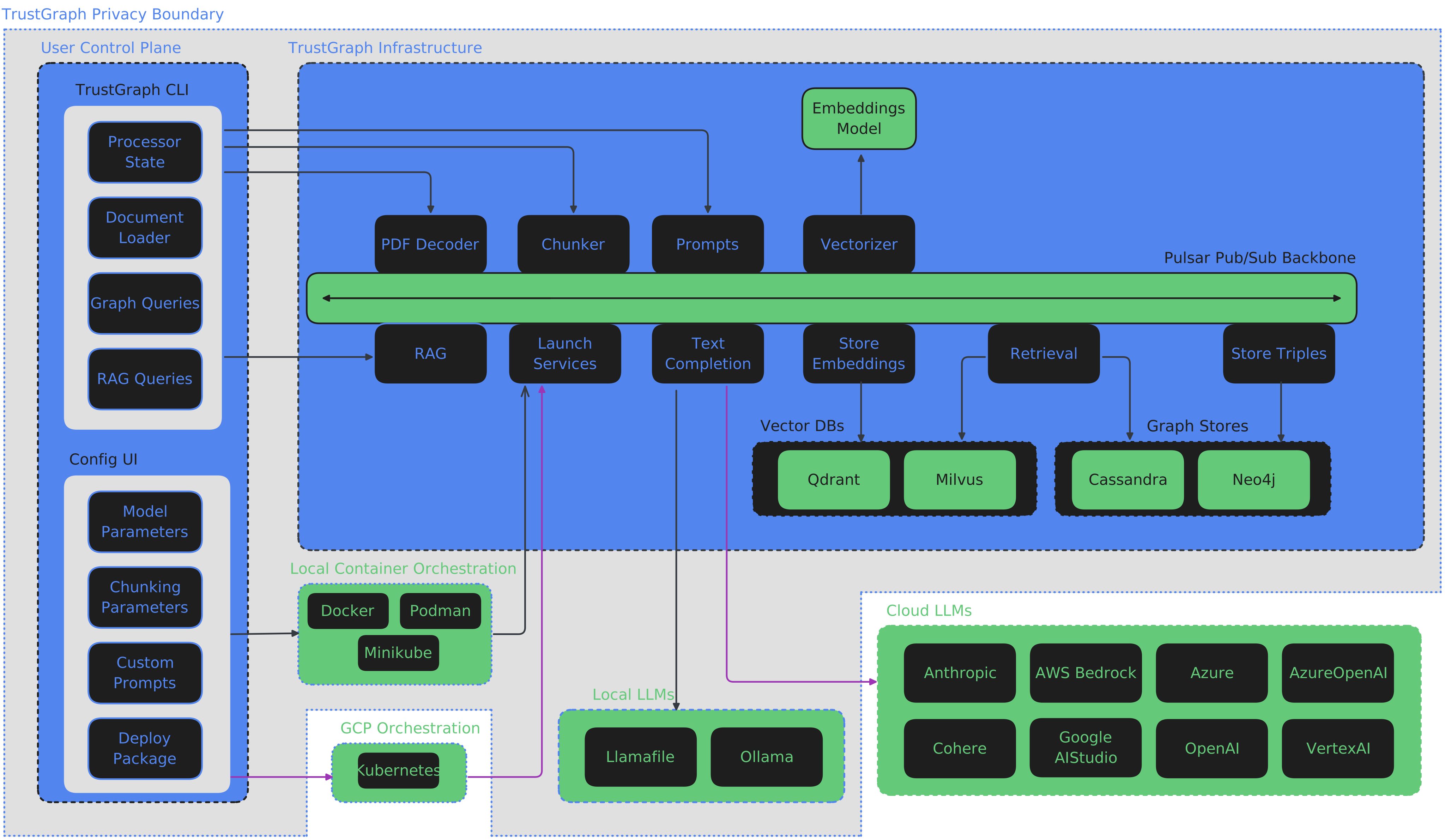
TrustGraph is designed to be modular to support as many LLMs and environments as possible. A natural fit for a modular architecture is to decompose functions into a set of modules connected through a pub/sub backbone. Apache Pulsar serves as this pub/sub backbone. Pulsar acts as the data broker managing data processing queues connected to procesing modules.
Pulsar Workflows
- For processing flows, Pulsar accepts the output of a processing module and queues it for input to the next subscribed module.
- For services such as LLMs and embeddings, Pulsar provides a client/server model. A Pulsar queue is used as the input to the service. When processed, the output is then delivered to a separate queue where a client subscriber can request that output.
Data Extraction Agents
TrustGraph extracts knowledge documents to an ultra-dense knowledge graph using 3 automonous data extraction agents. These agents focus on individual elements needed to build the knowledge graph. The agents are:
- Topic Extraction Agent
- Entity Extraction Agent
- Relationship Extraction Agent
The agent prompts are built through templates, enabling customized data extraction agents for a specific use case. The data extraction agents are launched automatically with the loader commands.
PDF file:
tg-load-pdf <document.pdf>
Text or Markdown file:
tg-load-text <document.txt>
RAG Queries
Once the knowledge graph and embeddings have been built or a knowledge core has been loaded, RAG queries are launched with a single line:
tg-query-graph-rag -q "Write a blog post about the 5 key takeaways from SB1047 and how they will impact AI development."