## The Agent Intelligence Platform
[](https://pypi.org/project/trustgraph/) [](https://discord.gg/sQMwkRz5GX)
📑 [Full Docs](https://docs.trustgraph.ai/docs/TrustGraph) 📺 [YouTube](https://www.youtube.com/@TrustGraphAI?sub_confirmation=1) 🔧 [Configuration Builder](https://config-ui.demo.trustgraph.ai/) ⚙️ [API Docs](docs/apis/README.md) 🧑💻 [CLI Docs](https://docs.trustgraph.ai/docs/running/cli) 💬 [Discord](https://discord.gg/sQMwkRz5GX) 📖 [Blog](https://blog.trustgraph.ai/subscribe)
Seamlessly manage and deliver modular intelligence to power your AI agents. With a Services Warehouse for AI components, Knowledge Graphs for deep relationships, and VectorDBs for semantic discovery, **TrustGraph** unifies these critical capabilities to ensure your AI operates with private, traceable, and contextually rich knowledge – anywhere you deploy.
---
Table of Contents
- 🎯 [**Why TrustGraph?**](#-why-trustgraph)
- 🚀 [**Getting Started**](#-getting-started)
- 🔧 [**Configuration Builder**](#-configuration-builder)
- 🔎 [**TrustRAG**](#-trustrag)
- 🧠 [**Knowledge Cores**](#-knowledge-cores)
- 📐 [**Architecture**](#-architecture)
- 🧩 [**Integrations**](#-integrations)
- 📊 [**Observability & Telemetry**](#-observability--telemetry)
- 🤝 [**Contributing**](#-contributing)
- 📄 [**License**](#-license)
- 📞 [**Support & Community**](#-support--community)
---
## 🎯 Why TrustGraph?
* **Unified Knowledge:** Define and deploy complete knowledge environments, including models, dependencies, and tooling, as a single, manageable unit.
* **No-code TrustRAG Pipelines:** Deploy full end-to-end RAG pipelines using unique TrustGraph algorithms leveraging both Knowledge graphs and VectorDBs.
* **Environment-Agnostic Deployment:** Provision consistently across diverse infrastructures (Cloud, On-Prem, Edge, Dev environments). Build once, provision anywhere.
* **Trusted & Secure Delivery:** Focuses on providing a secure supply chain for AI components.
* **Simplified Operations:** Radically reduce the complexity and time required to stand up and manage sophisticated AI stacks. Get operational faster.
* **Open Source & Extensible:** Built with transparency and community collaboration in mind. Easily inspect, modify, and extend the platform to meet your specific provisioning needs.
* **Component Flexibility:** Avoid component lock-in. TrustGraph integrates multiple options for all system components.
## 🚀 Getting Started
- [Install the CLI](#install-the-trustgraph-cli)
- [Configuration Builder](#-configuration-builder)
- [Platform Restarts](#platform-restarts)
- [Test Suite](#test-suite)
- [Example Notebooks](#example-trustgraph-notebooks)
### Developer APIs and CLI
- [**REST API**](docs/apis/README.md#rest-apis)
- [**Websocket API**](docs/apis/README.md#websocket-api)
- [**Python SDK**](https://trustgraph.ai/docs/api/apistarted)
- [**TrustGraph CLI**](https://trustgraph.ai/docs/running/cli)
See the [API Developer's Guide](#api-documentation) for more information.
For users, **TrustGraph** has the following interfaces:
- [**Configuration Builder**](#-configuration-builder)
- [**Test Suite**](#test-suite)
The `trustgraph-cli` installs the commands for interacting with TrustGraph while running along with the Python SDK. The **Configuration Builder** enables customization of TrustGraph deployments prior to launching. The **REST API** can be accessed through port `8088` of the TrustGraph host machine with JSON request and response bodies.
### Install the TrustGraph CLI
```
pip3 install trustgraph-cli==
```
> [!CAUTION]
> The `trustgraph-cli` version *must* match the selected **TrustGraph** release version.
## 🔧 Configuration Builder
TrustGraph is endlessly customizable by editing the `YAML` resource files. The **Configuration Builder** provides a tool for building a custom configuration that deploys with your selected orchestration method in your target environment.
- [**Configuration Builder** 🚀](https://config-ui.demo.trustgraph.ai/)
The **Configuration Builder** has 5 important sections:
- 🚢 **TrustGraph Version**: Select the version of TrustGraph you'd like to deploy
- ✅ **Component Selection**: Choose from the available deployment platforms, LLMs, graph store, VectorDB, chunking algorithm, chunking parameters, and LLM parameters
- 🧰 **Customization**: Customize the prompts for the LLM System, Data Extraction Agents, and Agent Flow
- 🕵️ **Test Suite**: Add the **Test Suite** to the configuration available on port `8888`
- 🚀 **Finish Deployment**: Download the launch `YAML` files with deployment instructions
The **Configuration Builder** will generate the `YAML` files in `deploy.zip`. Once `deploy.zip` has been downloaded and unzipped, launching TrustGraph is as simple as navigating to the `deploy` directory and running:
```
docker compose up -d
```
> [!TIP]
> Docker is the recommended container orchestration platform for first getting started with TrustGraph.
When finished, shutting down TrustGraph is as simple as:
```
docker compose down -v
```
### Platform Restarts
The `-v` flag will destroy all data on shut down. To restart the system, it's necessary to keep the volumes. To keep the volumes, shut down without the `-v` flag:
```
docker compose down
```
With the volumes preserved, restarting the system is as simple as:
```
docker compose up -d
```
All data previously in TrustGraph will be saved and usable on restart.
### Test Suite
If added to the build in the **Configuration Builder**, the **Test Suite** will be available at port `8888`. The **Test Suite** has the following capabilities:
- **Graph RAG Chat** 💬: Graph RAG queries in a chat interface
- **Vector Search** 🔎: Semantic similarity search with cosine similarity scores
- **Semantic Relationships** 🕵️: See semantic relationships in a list structure
- **Graph Visualizer** 🌐: Visualize semantic relationships in **3D**
- **Data Loader** 📂: Directly load `.pdf`, `.txt`, or `.md` into the system with document metadata
### Example TrustGraph Notebooks
- [**REST API Notebooks**](https://github.com/trustgraph-ai/example-notebooks/tree/master/api-examples)
- [**Python SDK Notebooks**](https://github.com/trustgraph-ai/example-notebooks/tree/master/api-library)
TrustGraph is fully containerized and is launched with a `YAML` configuration file. Unzipping the `deploy.zip` will add the `deploy` directory with the following subdirectories:
- `docker-compose`
- `minikube-k8s`
- `gcp-k8s`
> [!NOTE]
> As more integrations have been added, the number of possible combinations of configurations has become quite large. It is recommended to use the `Configuration Builder` to build your deployment configuration. Each directory contains `YAML` configuration files for the default component selections.
**Docker**:
```
docker compose -f up -d
```
**Kubernetes**:
```
kubectl apply -f
```
TrustGraph is designed to be modular to support as many LLMs and environments as possible. A natural fit for a modular architecture is to decompose functions into a set of modules connected through a pub/sub backbone. [Apache Pulsar](https://github.com/apache/pulsar/) serves as this pub/sub backbone. Pulsar acts as the data broker managing data processing queues connected to procesing modules.
## 🔎 TrustRAG
TrustGraph incorporates **TrustRAG**, an advanced RAG approach that leverages automatically constructed Knowledge Graphs to provide richer and more accurate context to LLMs. Instead of relying solely on unstructured text chunks, TrustRAG understands and utilizes the relationships *between* pieces of information.
**How TrustRAG Works:**
1. **Automated Knowledge Graph Construction:**
* TrustGraph processes source data to automatically **extract key entities, topics, and the relationships** connecting them.
* It then maps these extracted **semantic relationships and concepts to high-dimensional vector embeddings**, capturing the nuanced meaning beyond simple keyword matching.
2. **Hybrid Retrieval Process:**
* When a query is received, TrustRAG first performs a **cosine similarity search** on the vector embeddings to identify potentially relevant concepts and relationships within the knowledge graph.
* This initial vector search **pinpoints relevant entry points** within the structured Knowledge Graph.
3. **Context Generation via Subgraph Traversal:**
* Based on the ranked results from the similarity search, TrustRAG dynamically **generates relevant subgraphs**.
* It starts from the identified entry points and traverses the connections within the Knowledge Graph. Users can configure the **number of 'hops'** (relationship traversals) to expand the contextual window, gathering interconnected information.
* This structured **subgraph**, containing entities and their relationships, forms a highly relevant and context-aware input prompt for the LLM that is endlessly configurable with options for the number of entities, relationships, and overall subgraph size.
## 🧠 Knowledge Cores
One of the biggest challenges currently facing RAG architectures is the ability to quickly reuse and integrate knowledge sets. **TrustGraph** solves this problem by storing the results of the document ingestion process in reusable Knowledge Cores. Being able to store and reuse the Knowledge Cores means the process has to be run only once for a set of documents. These reusable Knowledge Cores can be loaded back into **TrustGraph** and used for TrustRAG.
A Knowledge Core has two components:
- Set of Graph Edges
- Set of mapped Vector Embeddings
When a Knowledge Core is loaded into TrustGraph, the corresponding graph edges and vector embeddings are queued and loaded into the chosen graph and vector stores.
## 📐 Architecture
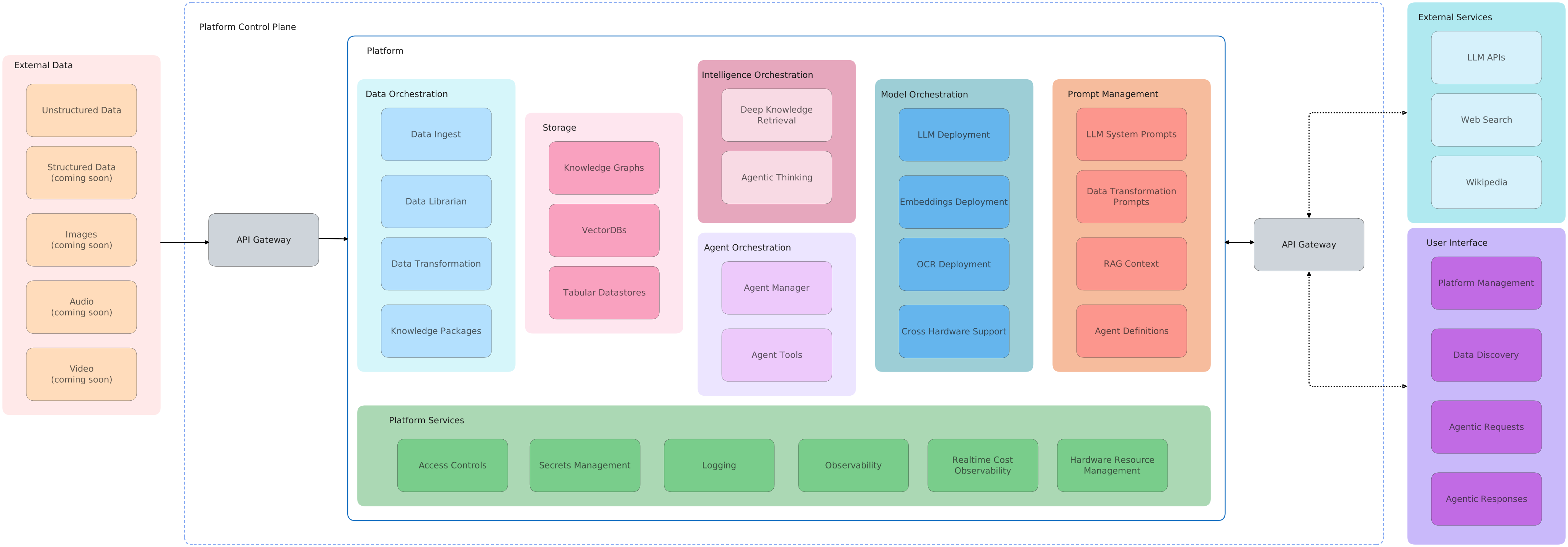
As a full-stack platform, TrustGraph provides all the stack layers needed to connect the data layer to the app layer for autonomous operations.
## 🧩 Integrations
TrustGraph seamlessly integrates API services, data stores, observability, telemetry, and control flow for a unified platform experience.
- LLM APIs: **Anthropic**, **AWS Bedrock**, **AzureAI**, **AzureOpenAI**, **Cohere**, **Google AI Studio**, **Google VertexAI**, **Mistral**, and **OpenAI**
- LLM Orchestration: **LM Studio**, **Llamafiles**, **Ollama**, **TGI**, and **vLLM**
- Vector Databases: **Qdrant**, **Pinecone**, and **Milvus**
- Knowledge Graphs: **Memgraph**, **Neo4j**, and **FalkorDB**
- Data Stores: **Apache Cassandra**
- Observability: **Prometheus** and **Grafana**
- Control Plane: **Apache Pulsar**
- Clouds: **AWS**, **Azure**, **Google Cloud**, **Scaleway**, and **Intel Tiber Cloud**
### Pulsar Control Flows
- For control flows, Pulsar accepts the output of a processing module and queues it for input to the next subscribed module.
- For services such as LLMs and embeddings, Pulsar provides a client/server model. A Pulsar queue is used as the input to the service. When processed, the output is then delivered to a separate queue where a client subscriber can request that output.
### Document Extraction Agents
TrustGraph extracts knowledge documents to an ultra-dense knowledge graph using 3 automonous data extraction agents. These agents focus on individual elements needed to build the knowledge graph. The agents are:
- Topic Extraction Agent
- Entity Extraction Agent
- Relationship Extraction Agent
The agent prompts are built through templates, enabling customized data extraction agents for a specific use case. The data extraction agents are launched automatically with the loader commands.
PDF file:
```
tg-load-pdf
```
Text or Markdown file:
```
tg-load-text
```
### Graph RAG Queries
Once the knowledge graph and embeddings have been built or a cognitive core has been loaded, RAG queries are launched with a single line:
```
tg-invoke-graph-rag -q "What are the top 3 takeaways from the document?"
```
### Agent Flow
Invoking the Agent Flow will use a ReAct style approach the combines Graph RAG and text completion requests to think through a problem solution.
```
tg-invoke-agent -v -q "Write a blog post on the top 3 takeaways from the document."
```
> [!TIP]
> Adding `-v` to the agent request will return all of the agent manager's thoughts and observations that led to the final response.
## 📊 Observability & Telemetry
Once the platform is running, access the Grafana dashboard at:
```
http://localhost:3000
```
Default credentials are:
```
user: admin
password: admin
```
The default Grafana dashboard tracks the following:
- LLM Latency
- Error Rate
- Service Request Rates
- Queue Backlogs
- Chunking Histogram
- Error Source by Service
- Rate Limit Events
- CPU usage by Service
- Memory usage by Service
- Models Deployed
- Token Throughput (Tokens/second)
- Cost Throughput (Cost/second)
## 🤝 Contributing
[Developing for TrustGraph](docs/README.development.md)
## 📄 License
**TrustGraph** is licensed under [Apache 2.0](https://www.apache.org/licenses/LICENSE-2.0).
Copyright 2024-2025 TrustGraph
Licensed under the Apache License, Version 2.0 (the "License");
you may not use this file except in compliance with the License.
You may obtain a copy of the License at
http://www.apache.org/licenses/LICENSE-2.0
Unless required by applicable law or agreed to in writing, software
distributed under the License is distributed on an "AS IS" BASIS,
WITHOUT WARRANTIES OR CONDITIONS OF ANY KIND, either express or implied.
See the License for the specific language governing permissions and
limitations under the License.
## 📞 Support & Community
- Bug Reports & Feature Requests: [Discord](https://discord.gg/sQMwkRz5GX)
- Discussions & Questions: [Discord](https://discord.gg/sQMwkRz5GX)
- Documentation: [Docs](https://docs.trustgraph.ai/docs/getstarted)