 70ddf19489
* feat(x): client auto-update with non-interrupting UX
Auto-update via update.electronjs.org (Squirrel), replacing the native
update dialog with a state machine pushed to the renderer:
- Non-modal "restart to update" toast, deferred while a call/turn is
active and retracted if one starts; 24h "Later" snooze persisted in
main so it survives window reloads
- Offline detection: network errors get a soft `offline` state instead
of a red failure, and don't emit update_failed analytics
- Update-waiting badges: macOS dock badge, Windows taskbar overlay icon
- macOS move-to-Applications prompt parented to the main window, with a
failure fallback dialog and focus re-check after a manual drag
- Settings > Help: version, manual check with accurate transient
"You're up to date" feedback, per-state messaging
- "Updated to vX" card on first launch after an upgrade (downgrades
restamp silently); "What's new" links to release notes
- Toaster: follow app dark mode (fixes unreadable description text) and
restyle to theme tokens
- Window state persistence so restart-to-update feels lossless
- Tests for version stamping and upgrade comparison
* feat(x): replace update toast with Zed-style titlebar chip
The restart-to-update prompt moves from a sonner toast to a persistent,
non-interrupting titlebar indicator: a spinner while an update downloads,
then a 'Restart to update' chip once staged. Clicking restarts into the
new version; the x snoozes the chip for 24h via the existing persisted
snooze. Busy-deferral is dropped - the chip never interrupts.
Co-Authored-By: Claude Fable 5 <noreply@anthropic.com>
* feat(x): bottom-left update card with inline release notes
Reframe the restart prompt per PR feedback: by the time the user sees it,
Squirrel has already installed the update — the prompt only asks for a
restart (Chrome-style), and being loud about what shipped matters more
than being unobtrusive during early adoption.
- Replace the titlebar chip with a bottom-left "Update available" card
showing the new version, an inline "What's new" section rendered from
the GitHub release notes, and Later / Release notes / Restart now
- Release notes come from Squirrel.Mac's update feed (update.electronjs.org
passes the release body through); Squirrel.Windows only reports the
release name, so missing notes are backfilled from the GitHub API
- Drop the 24h snooze machinery — Later/× just dismiss for the session
- Drop offline detection (soft `offline` state) — separate PR later
- Drop the macOS move-to-Applications prompt/move button — separate PR
later; Settings still explains why updates are unavailable outside
/Applications
- Drop window state persistence
Co-Authored-By: Claude Fable 5 <noreply@anthropic.com>
* feat(x): aggregate release notes across skipped versions, persistent up-to-date status
- Updater aggregates release bodies for every version between the running
app and the update target, with a commit-log fallback when no release in
range has notes
- CI fills empty release bodies with GitHub's auto-generated notes
- Settings shows a persistent 'You're up to date' line with last-checked
time instead of a transient confirmation
* fix(x): restore updater:quitAndInstall lines dropped in merge
The conflict resolution in
|
||
|---|---|---|
| .github/workflows | ||
| apps | ||
| assets | ||
| .env.example | ||
| .gitattributes | ||
| .gitignore | ||
| build-electron.sh | ||
| CLAUDE.md | ||
| docker-compose.yml | ||
| Dockerfile.qdrant | ||
| google-setup.md | ||
| LICENSE | ||
| README.md | ||
| start.sh | ||

Rowboat
A desktop AI coworker with a memory of your work and built-in surfaces to act on it.




Rowboat indexes your work into a living knowledge graph and uses that to get work done on your machine. It includes work surfaces for collaborating with AI: email client, notes, browser, code mode, meeting note taker, and workspaces for different projects.
Download latest for Mac/Windows/Linux: Download

Demo - apps to code · Demo - knowledge graph
⭐ If you find Rowboat useful, please star the repo. It helps more people find it.
Overview
BrainRowboat indexes email, meetings, slack and assistant conversations into a living Obsidian-style backlinked knowledge graph. |

|
|
|

|
Background agentsYou can set up background agents that run on events like new email or on schedule like every day at 8am. They can connect to tools, search the web, use the browser and write code using Claude Code or Codex. |

|
Built-in BrowserRowboat includes a browser that lets you and assistant collaborate on web tasks. Because its isolated from your main browser, you can log in only to the accounts that want the assistant to access. |

|
Meeting NotesA local meeting note-taker that taps into mic & speaker, produces live transcript and summarizes the meeting in a markdown file and updates the knowledge graph. |

|
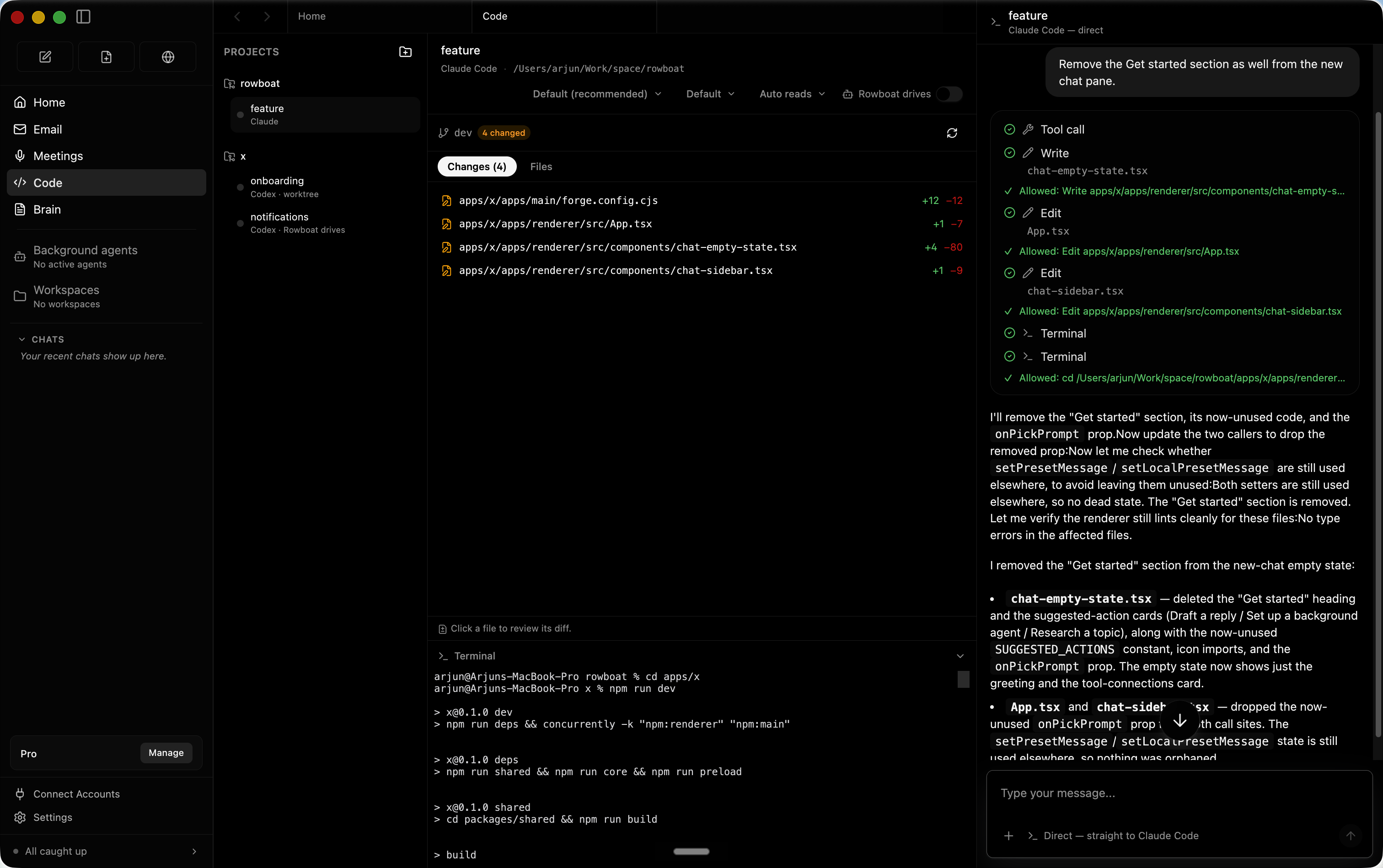
Code ModeCode mode lets you spin up parallel coding agents with Claude Code or Codex, and have Rowboat drive them with all the work context where needed. |
|
AppsYou can bulild your own work surfaces inside Rowboat — they get acess to all the tools and integrations, and you can share them with other people. |

|
IntegrationsIncludes one-click integrations to most popular products. |

|
Installation
Download latest for Mac/Windows/Linux: Download
All release files: https://github.com/rowboatlabs/rowboat/releases/latest
Google setup
To connect Google services (Gmail, Calendar, and Drive), follow Google setup.
Voice input
To enable voice input and voice notes (optional), add a Deepgram API key in ~/.rowboat/config/deepgram.json
Voice output
To enable voice output (optional), add an ElevenLabs API key in ~/.rowboat/config/elevenlabs.json
Web search
To use Exa research search (optional), add the Exa API key in ~/.rowboat/config/exa-search.json
External tools
To enable external tools (optional), you can add any MCP server or use Composio tools by adding an API key in ~/.rowboat/config/composio.json
All API key files use the same format:
{
  "apiKey": "<key>"
}
How it’s different
Most AI tools reconstruct context on demand by searching transcripts or documents.
Rowboat maintains long-lived knowledge instead:
- context accumulates over time
- relationships are explicit and inspectable
- notes are editable by you, not hidden inside a model
- everything lives on your machine as plain Markdown
The result is memory that compounds, rather than retrieval that starts cold every time.
Bring your own model
Rowboat works with the model setup you prefer:
- Local models via Ollama or LM Studio
- Hosted models (bring your own API key/provider)
- Swap models anytime — your data stays in your local Markdown vault
Extend Rowboat with tools (MCP)
Rowboat can connect to external tools and services via Model Context Protocol (MCP). That means you can plug in (for example) search, databases, CRMs, support tools, and automations - or your own internal tools.
Examples: Exa (web search), Twitter/X, ElevenLabs (voice), Slack, Linear/Jira, GitHub, and more.
Local-first by design
- All data is stored locally as plain Markdown
- No proprietary formats or hosted lock-in
- You can inspect, edit, back up, or delete everything at any time