| .. | ||
| crewai | ||
| langchain | ||
| config.yaml | ||
| docker-compose.yaml | ||
| Dockerfile | ||
| openai_protocol.py | ||
| pyproject.toml | ||
| README.md | ||
| run_demo.sh | ||
| start_agents.sh | ||
| traces.png | ||
| uv.lock | ||


Travel Agents in CrewAI and LangChain - with Plano
What you'll see: A travel assistant that seamlessly combines flight booking (CrewAI) and weather forecasts (LangChain) in a single conversation - with unified routing, orchestration, moderation, and observability across both frameworks.
The Problem
Building multi-agent systems today forces developers to:
- Pick one framework - can't mix CrewAI, LangChain, or custom agents easily
- Write plumbing code - authentication, request routing, error handling
- Rebuild for changes - want to swap frameworks? Start over
- Limited observability - no unified view across different agent frameworks
Plano's Solution
Plano acts as a framework-agnostic proxy and data plane that:
- Routes requests to the right agent(s), in the right order (CrewAI, LangChain, or custom)
- Normalizes requests/responses across frameworks automatically
- Provides unified authentication, tracing, and logs
- Lets you mix and match frameworks without coupling, so that you can continue to innovate easily
How To Run
Prerequisites
-
Install Plano CLI
uv tool install planoai -
Set Environment Variables
export OPENAI_API_KEY=your_key_here
export AEROAPI_KEY=your_key_here  # Get your free API key at https://flightaware.com/aeroapi/
Start the Demo
# From the demo directory
cd demos/agent_orchestration/multi_agent_crewai_langchain
./run_demo.sh
This starts Plano natively and runs agents as local processes:
- CrewAI Flight Agent (port 10520) - flight search
- LangChain Weather Agent (port 10510) - weather forecasts
Plano runs natively on the host (ports 12000, 8001).
To also start AnythingLLM (chat UI), Jaeger (tracing), and other optional services:
./run_demo.sh --with-ui
This additionally starts:
- AnythingLLM (port 3001) - chat interface
- Jaeger (port 16686) - distributed tracing
Try It Out
-
Using curl
curl -X POST http://localhost:8001/v1/chat/completions \ -H "Content-Type: application/json" \ -d '{"model": "gpt-4o", "messages": [{"role": "user", "content": "What is the weather in San Francisco?"}]}' -
Using AnythingLLM (requires
--with-ui)- Navigate to http://localhost:3001
- Create an account (stored locally)
-
Ask Multi-Agent Questions
"What's the weather in San Francisco and can you find flights from Seattle to San Francisco?"Plano automatically:
- Routes the weather part to the LangChain agent
- Routes the flight part to the CrewAI agent
- Combines responses seamlessly
-
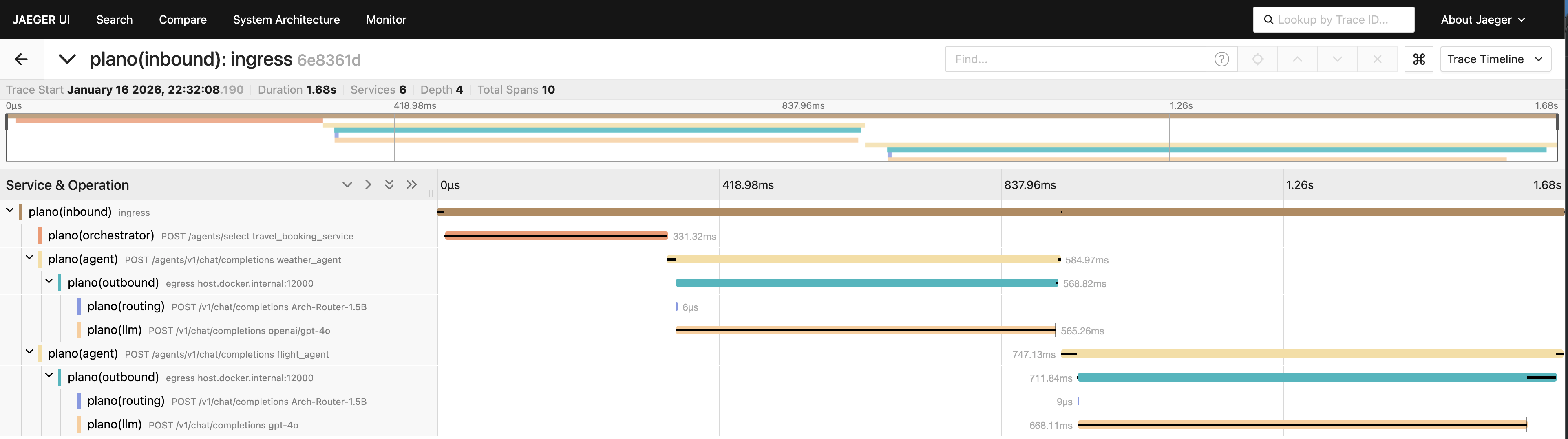
View Distributed Traces (requires
--with-ui)- Open http://localhost:16686 (Jaeger UI)
- See how requests flow through both agents
Architecture
┌──────────────┐
│ AnythingLLM  │ (Chat Interface)
└──────┬───────┘
       │
       v
┌─────────────┐
│    Plano    │ (Orchestration & DataPlane)
└──────┬──────┘
       │
       ├──────────────┬──────────────┐
       v              v              v
┌────────────┐ ┌────────────┐ ┌──────────┐
│  CrewAI    │ │ LangChain  │ │  Jaeger  │
│   Flight   │ │  Weather   │ │ (Traces) │
│   Agent    │ │   Agent    │ └──────────┘
└────────────┘ └────────────┘
       ├──────────────├
       v              v
┌─────────────┐
│    Plano    │ (Proxy LLM calls)
└──────┬──────┘
Travel Agents
Flight Agent
- Framework: CrewAI
- Capabilities: Flight search, itinerary planning
- Tools:
resolve_airport_code,search_flights - Data Source: FlightAware AeroAPI
Weather Agent
- Framework: LangChain
- Capabilities: Weather forecasts, conditions
- Tools:
get_weather_forecast - Data Source: Open-Meteo API
Cleanup
./run_demo.sh down
Next Steps
- Add your own agent - any framework, just expose the OpenAI-compatible endpoint
- Custom routing - modify
config.yamlto change agent selection logic - Production deployment - see Plano docs for scaling guidance