Agentic Workflow
Arch helps you easily personalize your applications by calling application-specific (API) functions via user prompts. This involves any predefined functions or APIs you want to expose to users to perform tasks, gather information, or manipulate data. This capability is generally referred to as function calling, where you have the flexibility to support “agentic” apps tailored to specific use cases - from updating insurance claims to creating ad campaigns - via prompts.
Arch analyzes prompts, extracts critical information from prompts, engages in lightweight conversation with the user to gather any missing parameters and makes API calls so that you can focus on writing business logic. Arch does this via its purpose-built Arch-FC LLM - the fastest (200ms p90 - 10x faser than GPT-4o) and cheapest (100x than GPT-40) function-calling LLM that matches performance with frontier models.
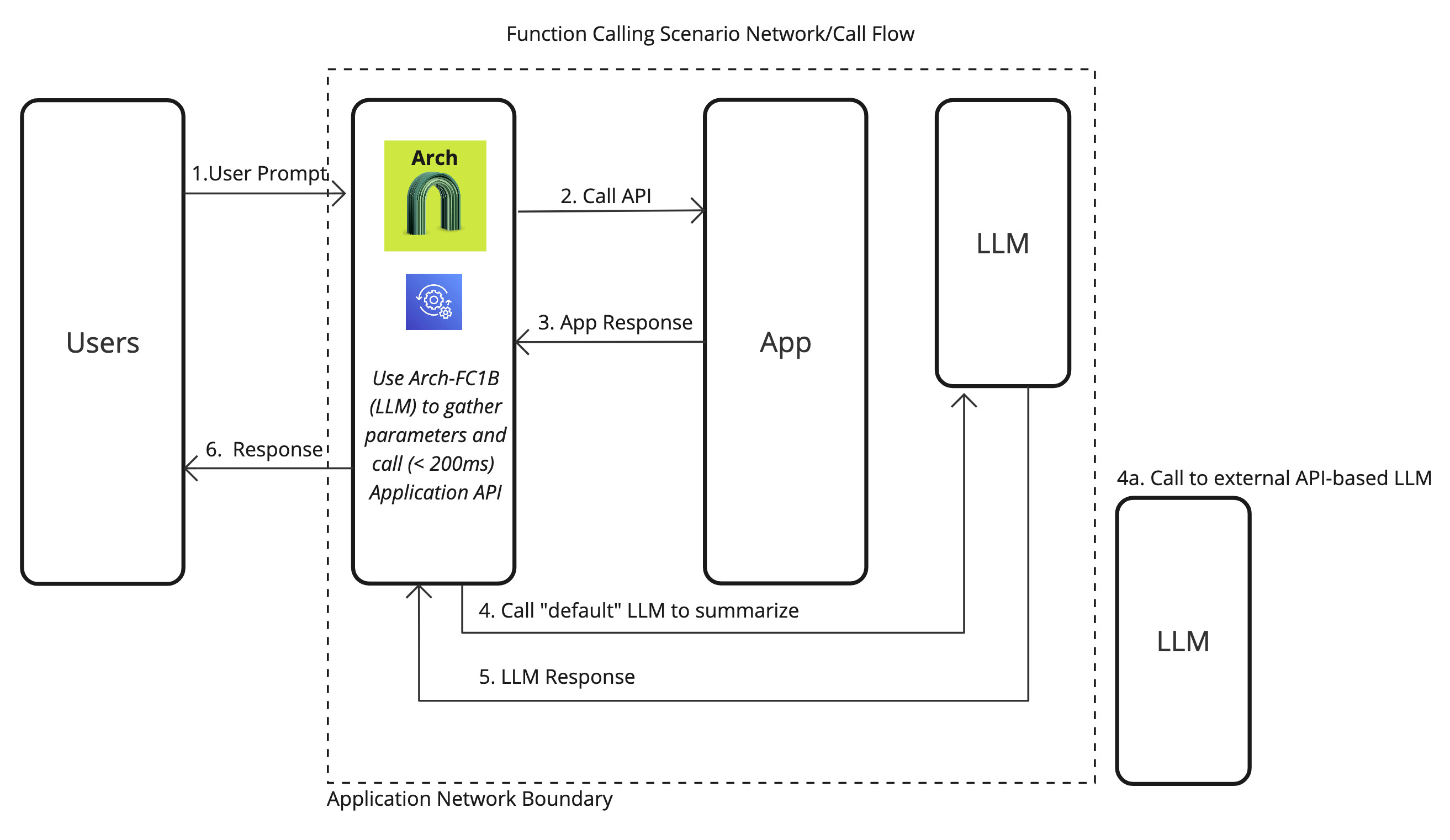
Single Function Call
In the most common scenario, users will request a single action via prompts, and Arch efficiently processes the request by extracting relevant parameters, validating the input, and calling the designated function or API. Here is how you would go about enabling this scenario with Arch:
Step 1: Define prompt targets with functions
 1version: "0.1-beta"
 2listen:
 3  address: 127.0.0.1 | 0.0.0.0
 4  port_value: 8080 #If you configure port 443, you'll need to update the listener with tls_certificates
 5
 6system_prompt: |
 7  You are a network assistant that just offers facts; not advice on manufacturers or purchasing decisions.
 8
 9llm_providers:
10  - name: "OpenAI"
11    provider: "openai"
12    access_key: OPENAI_API_KEY
13    model: gpt-4o
14    stream: true
15
16prompt_targets:
17  - name: reboot_devices
18    description: >
19      This prompt target handles user requests to reboot devices.
20      It ensures that when users request to reboot specific devices or device groups, the system processes the reboot commands accurately.
21
22      **Examples of user prompts:**
23
24      - "Please reboot device 12345."
25      - "Restart all devices in tenant group tenant-XYZ
26      - "I need to reboot devices A, B, and C."
27
28    path: /agent/device_reboot
29    parameters:
30      - name: "device_ids"
31        type: list  # Options: integer | float | list | dictionary | set
32        description: "A list of device identifiers (IDs) to reboot."
33        required: false
34      - name: "device_group"
35        type: string  # Options: string | integer | float | list | dictionary | set
36        description: "The name of the device group to reboot."
37        required: false
38
39# Arch creates a round-robin load balancing between different endpoints, managed via the cluster subsystem.
40endpoints:
41  app_server:
42    # value could be ip address or a hostname with port
43    # this could also be a list of endpoints for load balancing
44    # for example endpoint: [ ip1:port, ip2:port ]
45    endpoint: "127.0.0.1:80"
46    # max time to wait for a connection to be established
47    connect_timeout: 0.005s
Step 2: Process request parameters in Flask
Once the prompt targets are configured as above, handling those parameters is
 1from flask import Flask, request, jsonify
 2
 3app = Flask(__name__)
 4
 5@app.route('/agent/device_summary', methods=['POST'])
 6def get_device_summary():
 7    """
 8    Endpoint to retrieve device statistics based on device IDs and an optional time range.
 9    """
10    data = request.get_json()
11
12    # Validate 'device_ids' parameter
13    device_ids = data.get('device_ids')
14    if not device_ids or not isinstance(device_ids, list):
15        return jsonify({'error': "'device_ids' parameter is required and must be a list"}), 400
16
17    # Validate 'time_range' parameter (optional, defaults to 7)
18    time_range = data.get('time_range', 7)
19    if not isinstance(time_range, int):
20        return jsonify({'error': "'time_range' must be an integer"}), 400
21
22    # Simulate retrieving statistics for the given device IDs and time range
23    # In a real application, you would query your database or external service here
24    statistics = []
25    for device_id in device_ids:
26        # Placeholder for actual data retrieval
27        stats = {
28            'device_id': device_id,
29            'time_range': f'Last {time_range} days',
30            'data': f'Statistics data for device {device_id} over the last {time_range} days.'
31        }
32        statistics.append(stats)
33
34    response = {
35        'statistics': statistics
36    }
37
38    return jsonify(response), 200
39
40if __name__ == '__main__':
41    app.run(debug=True)
Parallel/ Multiple Function Calling
In more complex use cases, users may request multiple actions or need multiple APIs/functions to be called simultaneously or sequentially. With Arch, you can handle these scenarios efficiently using parallel or multiple function calling. This allows your application to engage in a broader range of interactions, such as updating different datasets, triggering events across systems, or collecting results from multiple services in one prompt.
Arch-FC1B is built to manage these parallel tasks efficiently, ensuring low latency and high throughput, even when multiple functions are invoked. It provides two mechanisms to handle these cases:
Step 1: Define Multiple Function Targets
When enabling multiple function calling, define the prompt targets in a way that supports multiple functions or API calls based on the user’s prompt. These targets can be triggered in parallel or sequentially, depending on the user’s intent.
Example of Multiple Prompt Targets in YAML:
 1version: "0.1-beta"
 2listen:
 3  address: 127.0.0.1 | 0.0.0.0
 4  port_value: 8080 #If you configure port 443, you'll need to update the listener with tls_certificates
 5
 6system_prompt: |
 7  You are a network assistant that just offers facts; not advice on manufacturers or purchasing decisions.
 8
 9llm_providers:
10  - name: "OpenAI"
11    provider: "openai"
12    access_key: OPENAI_API_KEY
13    model: gpt-4o
14    stream: true
15
16prompt_targets:
17  - name: reboot_devices
18    description: >
19      This prompt target handles user requests to reboot devices.
20      It ensures that when users request to reboot specific devices or device groups, the system processes the reboot commands accurately.
21
22      **Examples of user prompts:**
23
24      - "Please reboot device 12345."
25      - "Restart all devices in tenant group tenant-XYZ
26      - "I need to reboot devices A, B, and C."
27
28    path: /agent/device_reboot
29    parameters:
30      - name: "device_ids"
31        type: list  # Options: integer | float | list | dictionary | set
32        description: "A list of device identifiers (IDs) to reboot."
33        required: false
34      - name: "device_group"
35        type: string  # Options: string | integer | float | list | dictionary | set
36        description: "The name of the device group to reboot."
37        required: false
38
39# Arch creates a round-robin load balancing between different endpoints, managed via the cluster subsystem.
40endpoints:
41  app_server:
42    # value could be ip address or a hostname with port
43    # this could also be a list of endpoints for load balancing
44    # for example endpoint: [ ip1:port, ip2:port ]
45    endpoint: "127.0.0.1:80"
46    # max time to wait for a connection to be established
47    connect_timeout: 0.005s