| .. | ||
| experiments | ||
| config2.example.yaml | ||
| optimize.py | ||
| README.md | ||

AFlow: Automating Agentic Workflow Generation
AFlow is a framework for automatically generating and optimizing Agentic Workflows. It uses Monte Carlo tree search in a code-represented workflow space to find effective workflows, replacing manual development with machine effort. Our approach shows potential to outperform handcrafted workflows on various tasks.
Framework Components
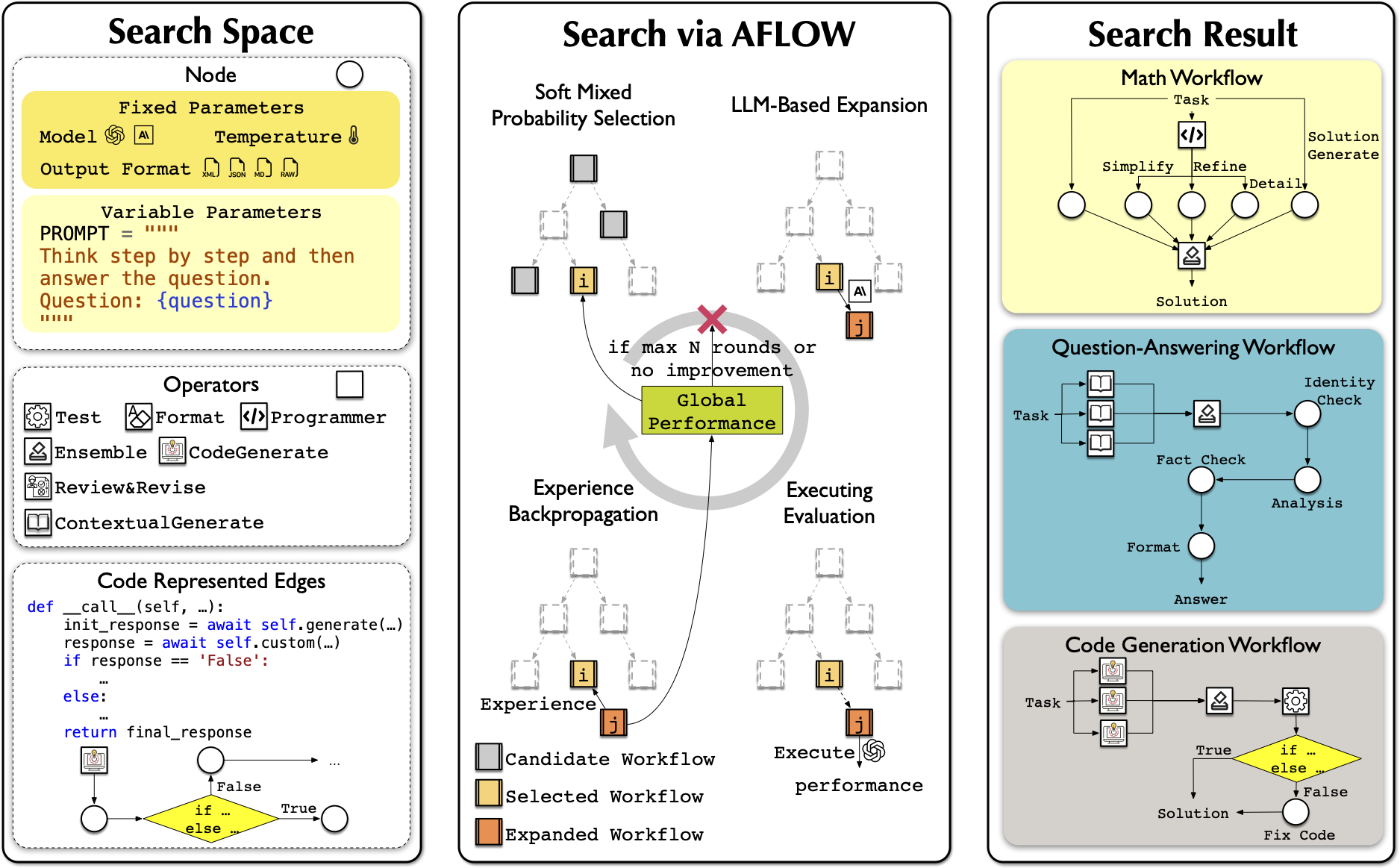
- Node: Basic unit of LLM invocation. See
metagpt/actions/action_node.pyfor a flexible interface to control LLM, temperature, format, and prompt. - Operator: Predefined combinations of Nodes to enhance search efficiency. Encapsulates common operations like Generate, Format, Review, Revise, Ensemble, Test, and Programmer. See
metagpt/ext/aflow/operator.pyfor details. You can customize your own Operator by referencing the implementations in this code. - Workflow: A sequence of LLM-invoking nodes connected by edges. Can be represented as graphs, neural networks, or code to express various execution structures. See
metagpt/ext/aflow/workflow.pyfor our implementation. - Optimizer: Uses LLMs within a Monte Carlo Tree Search variant to explore and refine workflows. Iteratively selects, expands, evaluates, and updates workflows based on performance. See
metagpt/ext/aflow/scripts/optimizer.pyfor details. - Evaluator: Assesses workflow performance on given tasks. Provides feedback to guide the optimization process towards more effective workflows. See
metagpt/ext/aflow/scripts/evaluator.pyfor details.
Datasets
Experimental Datasets
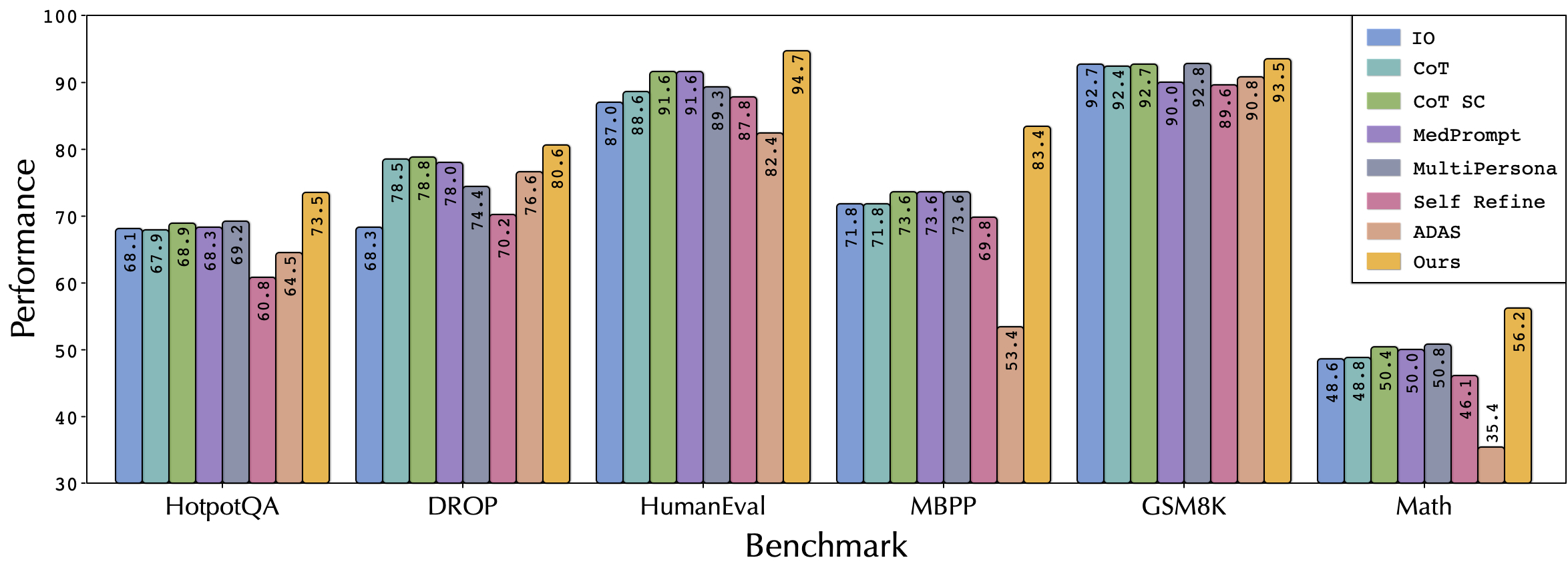
We conducted experiments on six datasets (HumanEval, MBPP, GSM8K, MATH, HotpotQA, DROP) and provide their evaluation code. The data can be found in this datasets link, or you can download them using metagpt/ext/aflow/data/download_data.py

Custom Datasets
For custom tasks, you can reference the code in the metagpt/ext/aflow/benchmark folder. Inherit the BaseBenchmark class and implement evaluate_problem, calculate_score, and get_result_columns to add your custom dataset benchmark. Then, add your benchmark name in metagpt/ext/aflow/scripts/evaluator.py and metagpt/ext/aflow/scripts/optimizer.py to find effective workflows for your custom dataset.
Quick Start
- Configure your search in
optimize.py:- Open
examples/aflow/optimize.py - Set the following parameters:
dataset = "HumanEval" # Choose from: "HumanEval", "MBPP", "GSM8K", "MATH", "HotpotQA", "DROP" or your custom dataset name question_type = "code" # Choose from: "math", "code", "qa" sample = 4 # Number of samples to use for optimization check_convergence = True # Whether to check for convergence optimized_path = "path/to/optimized/workflows" # Path to save optimized workflows, defaults to metagpt/ext/aflow/scripts/optimized initial_round = 1 # Starting round number max_rounds = 20 # Maximum number of optimization rounds validation_rounds = 5 # The validation rounds of AFLOW. - Adjust these parameters according to your specific requirements and dataset
- Open
- Set up parameters in
config/config2.yaml(seeexamples/aflow/config2.example.yamlfor reference) - Set the operator you want to use in
optimize.pyand inoptimized_path/template/operator.py,optimized_path/template/operator.json. You can reference our implementation to add operators for specific datasets - When you first run, you can download the datasets and initial rounds by setting
download(["datasets", "initial_rounds"])inexamples/aflow/optimize.py - (Optional) Add your custom dataset and corresponding evaluation function following the Custom Datasets section
- (Optional) If you want to use a portion of the validation data, you can set
va_listinexamples/aflow/evaluator.py - Run
python examples/aflow/optimize.pyto start the optimization process!
Reproduce the Results in the Paper
- We provide the raw data obtained from our experiments (link), including the workflows and prompts generated in each iteration, as well as their trajectories on the validation dataset. We also provide the optimal workflow for each dataset and the corresponding data on the test dataset. You can download these data using
metagpt/ext/aflow/data/download_data.py. - You can directly reproduce our experimental results by running the scripts in
examples/aflow/experiments.
Citation
If you use AFlow in your research, please cite our paper:
@article{zhang2024aflow,
  title={AFlow: Automating Agentic Workflow Generation},
  author={Zhang, Jiayi and Xiang, Jinyu and Yu, Zhaoyang and Teng, Fengwei and Chen, Xionghui and Chen, Jiaqi and Zhuge, Mingchen and Cheng, Xin and Hong, Sirui and Wang, Jinlin and others},
  journal={arXiv preprint arXiv:2410.10762},
  year={2024}
}